A CNC machine that stops mid-shift costs more than the repair. Orders slip, scrap piles up and operators wait while someone hunts for the cause.
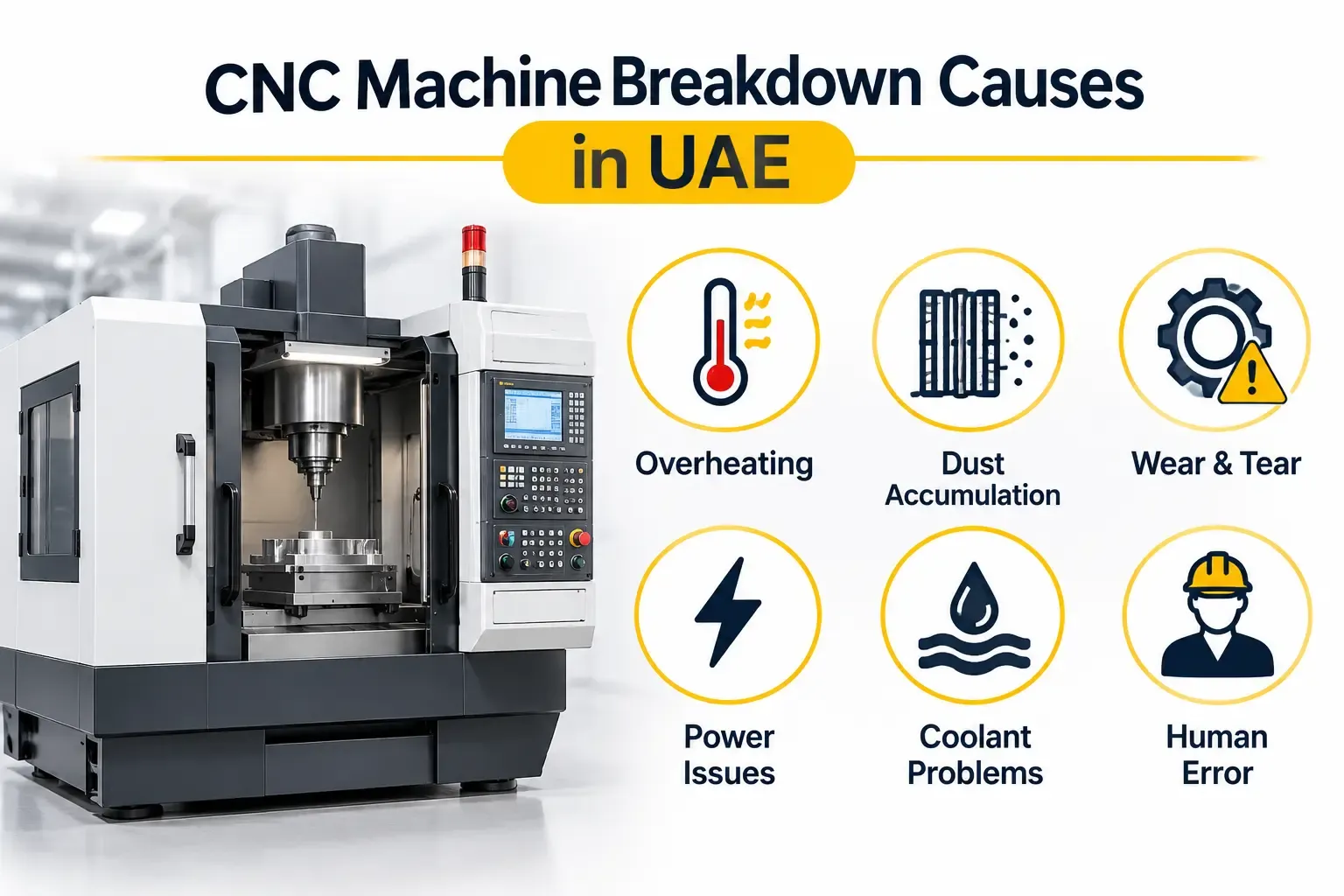
Most CNC machine breakdown causes fall into a short list. Spindles overheat, drives trip, encoders lose position and heat builds up in the cabinet. The same faults appear again and again, especially in UAE workshops where dust and high temperatures add stress.
This guide covers the ten most common faults, the warning signs for each and the practical fixes. It also shows which jobs your team can handle and which need a specialist.
CNC Machine Breakdown Causes: Check These Before You Dismantle Anything
A few habits save hours in any fault-finding job.
- Read the alarm first. Note the exact code and message before clearing anything. Alarm history often shows what happened just before the stop.
- Do not reset repeatedly. Repeated resets on a drive or spindle fault can damage power components.
- Ask what changed. A new program, a crash, a power dip or a maintenance job can all point to the cause.
- Work safely. Lock out and isolate the machine, and wait for the drive DC bus to discharge before touching any electrical connection.
With that done, work through the faults below. They are ordered roughly from the most severe to the most routine.
1. Spindle Overheating and Bearing Failure
The spindle is the heart of the machine, so spindle trouble is one of the costliest CNC faults.
Warning signs: rising spindle temperature, a whining or rumbling noise, poor surface finish, vibration at speed and overload or overheat alarms.
Common causes:
- Worn or contaminated spindle bearings
- Failed spindle chiller or blocked coolant lines
- Poor lubrication
- Tool crashes or sustained overload
- Coolant or dust entering the spindle
How to fix it:
- Check the chiller, coolant flow and lubrication first. These are simple and often the real cause.
- Inspect the tool holder and drawbar for wear or damage.
- Measure vibration and temperature trend against a known good baseline.
- If the noise or heat persists, stop running the machine. Bearing damage grows quickly and can ruin the shaft and housing.
Bearing replacement and spindle rebuilds need clean-room style care and precise preload, so leave them to a specialist.
2. Servo Drive and Servo Motor Faults
Each axis relies on a servo drive and motor. When either fails, the axis stops or moves unevenly.
Warning signs: overcurrent, overload or overvoltage alarms, axis shudder, a motor running hot and drive error codes that return after a reset.
Common causes:
- Failed power stage or capacitors inside the drive
- Damaged or shorted motor winding
- Loose or damaged power cables
- Overloaded axes from binding or crashes
- Heat and dust inside the drive
How to fix it:
- Read the drive code and compare it with the manufacturer's manual.
- Check motor cables and connectors for damage or loose pins.
- Disconnect the motor and test winding and insulation resistance.
- Move the axis by hand with power off to check for mechanical binding.
If the drive itself has failed, repair is often cheaper than replacement. Our article on servo drive repair cost in the UAE explains what affects the price.
3. Encoder and Feedback Errors
The controller depends on feedback to know where each axis is. If the feedback is wrong, the machine either stops or cuts in the wrong place.
Warning signs: position deviation or following-error alarms, axes that drift, jerky motion and "encoder disconnected" faults.
Common causes:
- Damaged or poorly shielded encoder cables
- Coolant or dirt on encoders and linear scales
- Failed encoder electronics
- Low backup battery on absolute encoders
How to fix it:
- Inspect the feedback cable, connector and shield termination.
- Clean scales and encoder heads gently, following the maker's guidance.
- Check the absolute encoder battery and replace it with power on, if the maker advises.
- If the fault follows the motor, the encoder itself needs testing or repair.
4. Unstable Power Supply and Voltage Problems
A CNC machine is sensitive to the quality of its incoming power. Voltage dips, phase imbalance and spikes cause faults that look random.
Warning signs: undervoltage or phase alarms, controller restarts, faults after nearby heavy equipment starts and recurring alarms that clear with a restart.
Common causes:
- Voltage sag or imbalance on the supply
- Loose incoming terminals
- Poor earthing
- Failed internal power supplies
- Electrical noise from nearby drives or welders
How to fix it:
- Measure incoming voltage on all phases, ideally while logging over time.
- Tighten terminals and check the earth connection.
- Check the machine's internal DC supplies against their specification.
- Consider a line reactor, voltage stabiliser or isolation transformer if the supply is unreliable.
5. Electrical Cabinet Overheating
Heat inside the control cabinet shortens the life of drives, power supplies and boards. In UAE conditions, this is among the most common hidden CNC machine breakdown causes.
Warning signs: drive over-temperature alarms, faults that appear in the afternoon, clogged filters and cabinet doors that feel hot.
Common causes:
- Blocked or dirty cabinet filters
- Failed cooling fans
- A cabinet air conditioner that has stopped working or is undersized
- Open doors or missing seals that let in dust and hot air
How to fix it:
- Clean or replace filters and check that all fans spin freely.
- Test the cabinet cooler and check the temperature setpoint.
- Seal gaps and keep doors closed during operation.
- Compare cabinet temperature with component ratings.
For sizing and selection, see our guide on control panel cooling in UAE heat.
6. Lubrication Failure and Ball Screw Wear
Mechanical wear builds slowly, but it affects accuracy long before it stops the machine.
Warning signs: growing backlash, noise from the ball screw or guideways, poor positioning accuracy, rough surface finish and lubrication low-level alarms.
Common causes:
- A blocked or empty automatic lubrication system
- Wrong or contaminated lubricant
- Worn ball screw nuts or guideways
- Crashes that damage the screw or bearings
How to fix it:
- Check lubricant level, pump operation and distributor lines.
- Inspect guideway covers and wipers for damage.
- Measure backlash and compare it with the machine's specification.
- Adjust preload or compensate in the controller for minor wear, and replace worn components when needed.
7. Coolant and Contamination Problems
Coolant, oil mist and chips find their way into places they should not reach.
Warning signs: intermittent sensor or cable faults, corroded connectors, clogged filters, rust on guideways and coolant in the spindle area.
Common causes:
- Damaged seals, wipers or cable glands
- Poor coolant condition and filtration
- Chips packed around sensors and scales
- Broken guards or covers
How to fix it:
- Clean chips and sludge from sensors, scales and chip conveyors.
- Replace damaged seals, wipers and cable glands.
- Check coolant concentration and filtration on a set schedule.
- Dry and clean affected connectors, and replace any that are corroded.
8. Limit Switch, Proximity Sensor and Homing Faults
Small sensors cause many large stoppages. A machine that cannot find its home position cannot start.
Warning signs: reference return failures, overtravel alarms, an axis that stops short and faults that appear only at one position.
Common causes:
- Dirty, damaged or misaligned sensors
- Broken wires or loose connectors
- Moved or loose switch cams
- Failed sensors after coolant exposure
How to fix it:
- Check the sensor input state on the controller's diagnostic screen.
- Clean the sensor and its target, and check the gap.
- Inspect cable and connector for breaks.
- Replace the sensor if its signal does not change when triggered.
9. Software, Parameter and Backup Problems
Not every breakdown is a hardware failure. Lost or corrupted data can stop a machine as completely as a broken part.
Warning signs: parameter or memory alarms, lost offsets, PLC errors after a power loss and a controller that boots with default settings.
Common causes:
- Dead memory backup batteries
- Corrupted parameters after a power failure
- Incorrect parameter changes
- Failed memory or storage devices
How to fix it:
- Restore parameters and PLC data from your latest backup.
- Replace the memory backup battery on schedule, with the controller powered on.
- Record every parameter change.
- Keep an up-to-date backup of parameters, PLC programs and machine data, stored away from the machine.
If no backup exists, a specialist can often recover or rebuild the data. This is why a routine backup is one of the cheapest forms of protection.
10. Tool Changer, Clamping and Pneumatic or Hydraulic Faults
Tool changers, clamps and chucks depend on air pressure and hydraulics. A pressure drop can stop production quickly.
Warning signs: tool change errors, slow or jerky tool changer movement, low air or hydraulic pressure alarms and workpieces that move during cutting.
Common causes:
- Water or oil in the air supply
- Leaking hoses, fittings or seals
- Clogged filters and regulators
- Faulty solenoid valves or pressure switches
- Worn tool changer parts
How to fix it:
- Check supply pressure at the machine inlet and drain water traps.
- Inspect hoses and fittings for leaks.
- Replace clogged filters and check regulator settings.
- Test solenoid valves and pressure switches.
Which Faults Can Your Team Fix, and When Should You Call a Specialist?
In-house teams can usually handle filters, lubrication, sensor cleaning, battery replacement, backup restoration and basic air checks.
Call a specialist when you see any of these:
- Repeated drive, spindle or power faults after a reset
- Spindle noise or heat that does not clear after basic checks
- Axis feedback faults that follow the motor
- Burning smell, visible damage or tripped protection
- Faults on controller boards or power supplies
A good specialist will diagnose before quoting. Our CNC machine repair services cover controls, drives and spindles. To plan downtime, read what affects repair turnaround time on industrial boards.
Repair, Retrofit or Replace?
Sometimes a machine has more faults than it is worth fixing. The decision comes down to repair cost, remaining machine life, the age of the control system and the availability of spares.
If the mechanics are sound but the control is obsolete, a retrofit may be the better path. Our comparison of CNC retrofit vs a new machine walks through the financial side.
Spare parts also matter. A machine waiting weeks for a single board loses more than the part costs. See how UAE plants manage automation spare parts lead time to avoid that.
How to Prevent CNC Breakdowns in UAE Conditions
Most of the faults above build up slowly, so routine care prevents most of them.
Daily:
- Check lubricant, coolant and air pressure levels
- Clear chips from guards, sensors and chip conveyors
- Listen for new noises and note any alarms
Weekly or monthly:
- Clean cabinet filters and check cooling fans
- Inspect cables, connectors and cable carriers
- Check way covers, wipers and seals
Every six to twelve months:
- Back up parameters, PLC programs and machine data
- Check backup batteries
- Measure backlash and review accuracy
- Log temperature and vibration trends on spindles and motors
To decide how far to go, compare preventive vs predictive maintenance for UAE plants.
Frequently Asked Questions
What are the most common causes of CNC machine breakdown?
The most common causes are spindle overheating and bearing wear, servo drive and motor faults, encoder errors, power supply problems, cabinet overheating, lubrication failure, contamination, sensor faults, lost parameters and pneumatic or hydraulic faults.
Why does my CNC machine keep showing the same alarm?
A repeating alarm usually means the root cause is still present. Resetting only clears the message. Check the alarm history, cables, cooling and power quality, and call a specialist if the same drive or spindle alarm returns.
How do I know if the spindle is failing?
Rising temperature, a whine or rumble, vibration, poor surface finish and overload alarms are the usual signs. Stop running the machine once these appear, because bearing damage spreads quickly.
Can I clear a CNC alarm and keep running?
Only after you understand the cause. Clearing an overcurrent, overheat or feedback alarm without finding the fault can damage drives, motors and the spindle.
How often should CNC machines be serviced?
Daily checks on lubrication, coolant and cleanliness, monthly checks on filters and cables, and a full inspection with backups every six to twelve months suit most machines. Heavy use or dusty UAE workshops may need shorter intervals.
Get Your CNC Machine Back on Line
If your machine is down or showing repeat faults, a proper diagnosis saves time and avoids repeat failures.
General Tech Automation supports CNC controls, drives and spindles across the UAE from its Sharjah base. Call +971 6 543 6933 or contact our team to discuss your machine and the fault you are seeing.